Black Friday brings more shoppers than any other week, and it costs more to bring each of them. Ad prices climb because every store is bidding at once, and shoppers come with a deal in mind and a tab open for each competitor.
You cannot do much about the cost of a visit. You can do a lot about what each visit is worth. This post is about average order value (AOV): getting the shoppers who already buy to put a little more in the cart, without cutting your margin to the bone.
What average order value is, and why it matters this week
Average order value is your sales divided by your number of orders. Shopify shows it in Analytics as Average order value. If you spend the same on ads to get each order, every extra dollar in that order is close to pure gain: the shipping label, the payment and the ad were already paid for.
That is why a store with a higher AOV can afford more ads, and win more of the auction, on the most expensive week of the year. Below are the changes that move it most, in the order I would set them up.
1. Sell the second one, not only the first
A flat 20% off everything trains shoppers to buy one item cheaper. A quantity ladder asks for more: 10% off one, 15% off three, 20% off six. The best deal sits next to a bigger cart, and the shopper sees exactly what they save at each step.
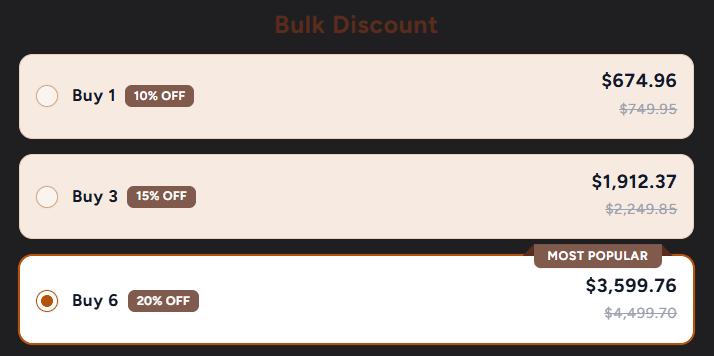
A few things make a ladder work:
- Show the price per step, with the full price crossed out. Shoppers should not need a calculator.
- Mark one step as the pick. A “Most popular” ribbon on the tier you want sold does a lot of quiet work.
- Use it on products people buy more than once: consumables, gifts, sizes for the family, team orders.
In Flash Box Builder a volume discount has up to six breaks, each with a percentage or an amount off, and any break can add a free gift or free shipping. The price on the ladder is the price at checkout. The volume discount guide walks through the setup.
2. Turn single products into gift sets
Black Friday is also the start of gift buying. A bundle answers “what should I get them” with one click, and it moves products that rarely sell alone. Two kinds work well:
- A fixed set of products that belong together, at one price below the sum of the parts.
- A build-your-own box, where the shopper picks the items and the box size, and the discount comes off once the box is full.
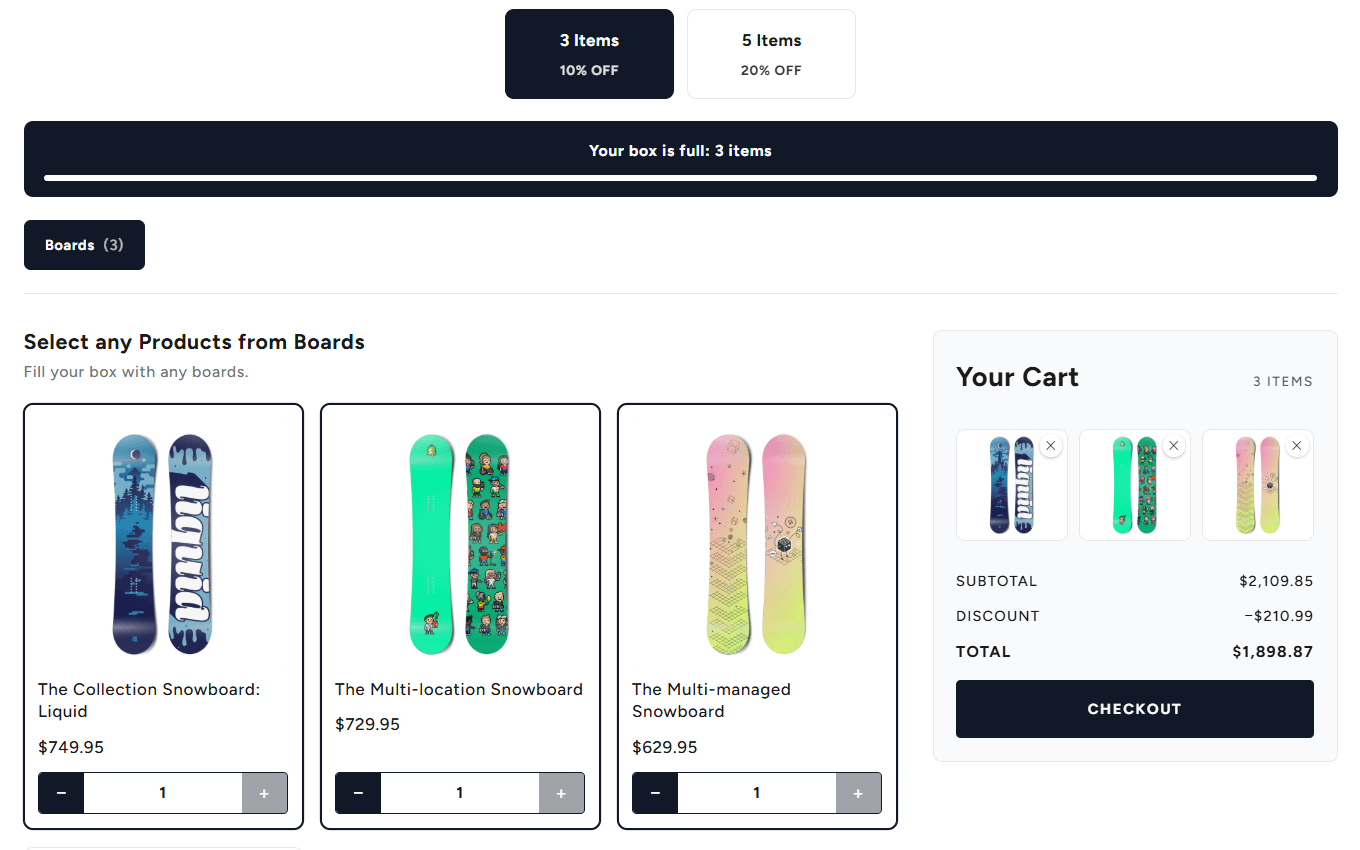
Put the box on the page where your Black Friday traffic lands, not only on its own product page. The Flash Bundle block puts it on any page of your theme.
3. Set a free-shipping goal a little above your usual order
Free shipping is the reason many shoppers add one more thing. Look at your average order value, set the free-shipping threshold a little above it, and show the gap in the cart: “You are $12 away from free shipping”. A goal that is too far away is ignored; one that is close gets chased.
Flash Cart Drawer Upsell shows that progress bar in the cart drawer, with up to three milestones. The later milestones can unlock other rewards, such as a free gift, so a shopper who reaches free shipping still has a reason to keep going.
4. Offer the small add-on, in the cart
The cart is where a shopper has already decided. That is the moment for a small, related item: the case for the phone, the refill for the bottle, the wax for the board. Keep these offers cheap next to what is in the cart, and relevant to it. A random best-seller in the cart is noise.
In Flash Cart Drawer Upsell you can set upsell rules (when this is in the cart, offer that) and fall back to Shopify’s own product recommendations when no rule matches.
5. Give a gift for reaching a cart value
“Spend $100, get a free tote” often works better than the same value as a discount. The gift feels like a bonus, and the shopper sees exactly how much more to add. Choose a gift that costs you little and that people actually want.
Flash Cart Drawer Upsell adds the gift to the cart by itself once the cart qualifies, so the shopper never has to find it. For a gift tied to one product, see Buy X, get Y in the cart drawer.
6. Ask once more, after checkout
Right after payment, a shopper is at their most willing. A one-click offer on the post-purchase page or the thank-you page adds an item to the order that already happened, and the shopper never types their card again. Flash Upsell does this, with an upsell and a downsell if the first offer is declined.
7. Use a real deadline
A countdown helps when the sale really ends at that time. Put the end date in an announcement bar with a timer (the cart drawer has one), and end the sale when it says. A timer that resets on every visit is easy to spot, and it costs you trust you need for next year.
Your checklist
Set these up in the first half of November, place a test order, and leave them alone during the sale. Changing settings in the middle of the busiest week is how stores break checkout.
- Volume discount on your best sellers, with the best tier marked Most popular
- One or two bundles or build-a-box gift sets, priced below the items bought one by one
- Free-shipping goal set a little above your usual order, with a progress bar in the cart
- In-cart upsells: small, related add-ons, not your most expensive product
- A free gift that unlocks at a cart value you choose
- A one-click offer after checkout for the order that already happened
- A countdown that ends when the sale really ends
- Everything tested on mobile, with a real order, before the week starts
Black Friday 2026 is on November 27 and Cyber Monday on November 30. The stores that win that week set things up before it.