“Buy the board, get the wax free” is one of the oldest offers in retail, and it is surprisingly fiddly to run on Shopify. Shopify’s own Buy X Get Y discount takes the gift off at checkout, but it does not put the gift in the cart. The shopper has to know the offer exists, find the wax, and add it themselves. Most don’t, so the offer quietly does nothing.
So the reward bar in Flash Cart Drawer Upsell can now be unlocked by a product. When a product you choose is in the cart, the tier unlocks and the drawer adds the gift on its own. This post covers what it can give away, how to set it up, and what it does not do yet.
What it does
Tiered Rewards is the progress bar at the top of the drawer. Until now a tier unlocked when the cart reached a total, like “spend $50”, or a number of items. A tier can now also unlock when a product is in the cart. Any variant of it counts, and you set how many the shopper needs, so “buy 2 shirts” works too.
The reward for that tier is one of four things:
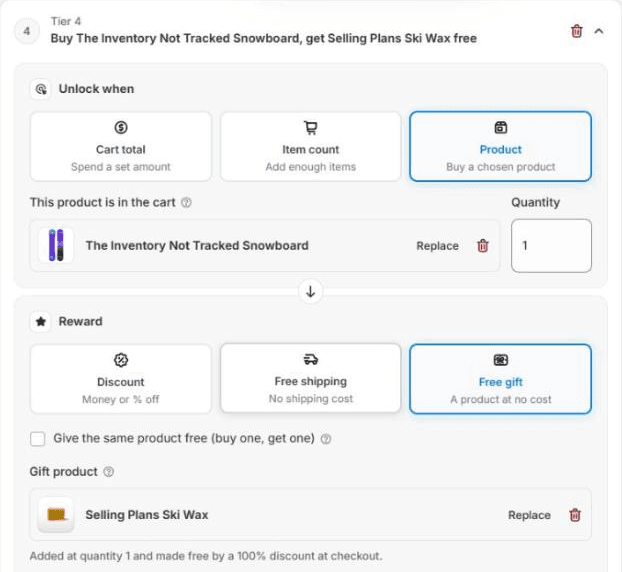
- A free gift. A different product, added to the cart for free the moment the goal is met.
- The same product again. Buy one, get one: the shopper gets one more of the product they bought, for free.
- A discount or free shipping. These show on the bar like any other tier.
The free gift is made free at checkout by a Shopify Function, which is Shopify’s way of letting an app run its own discount logic inside checkout. The first time you save a tier with a gift, the app creates one automatic discount called Cart Drawer Free Gift, which you will see in Shopify’s Discounts page. It takes 100% off the gift line the drawer added, and nothing else. If the shopper adds a second wax by hand, that one is charged at full price.
Setting one up
- Open the app, and under Your carts click the pencil next to your live cart.
- In the left list, under Body, click Tiered Rewards. If it isn’t on yet, switch it on with the eye icon next to its name.
- Click + Add Tier, or open a tier you already have. Under Unlock when, pick Product.
- Click Choose product and pick the product the shopper has to buy. Set Quantity to how many they need.
- Under Reward, pick Free gift. Then either click Choose gift product and pick the gift, or tick Give the same product free (buy one, get one).
- Choose a Free gift price: Show as zero, Show the actual price, or Actual price crossed out, then “Free”. The last one tells the shopper what the gift is worth.
- Give it a Reward Description, the name shoppers see on the bar, like “Free ski wax”. Then click Save at the top of the editor.
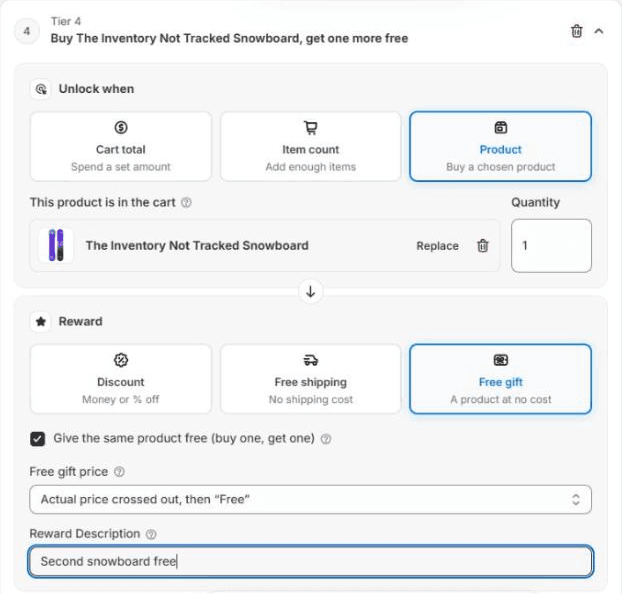
The tier’s title sums up the deal in one line, so you can check it reads the way you meant before you save. The Progress Message under the tier is what the shopper reads until they add the product. It starts as “Add {product} to unlock {reward}”, and you can also use {items} for how many are still missing.
What the shopper sees
Before the product is in the cart, the tier sits on the bar as the next milestone, with the gift icon and your message above it.
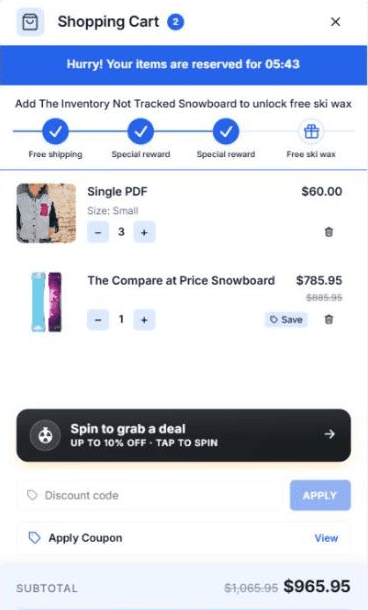
Once the product is in the cart, the milestone ticks and the gift drops in on its own row, with a Free tag on its picture and the price shown the way you chose. If you have the celebration card or confetti switched on, those play as well.
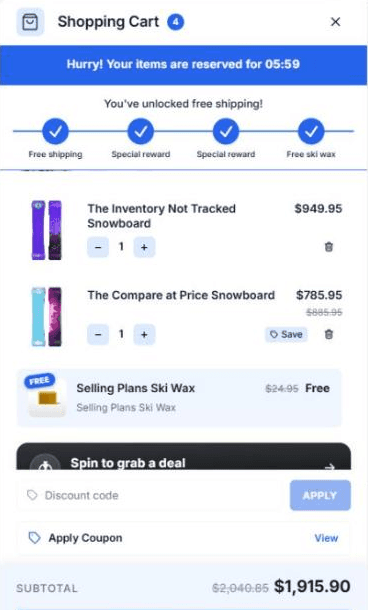
The gift row has no delete button. The gift is the reward for the goal, so the goal decides whether it stays: take the snowboard out and the wax goes with it. If the gift disappears some other way, say from your theme’s own cart page, the drawer puts it back the next time it checks the cart. If the gift’s variant is sold out, the drawer tries the product’s other in-stock variants, and adds nothing if they are all gone.
Rough edges
Things it does not do yet, so you don’t go looking.
- One product per tier. The goal is a single product. Collections, or “any of these three”, are not there yet.
- One gift, once. The gift is always one item. Buy two snowboards and the shopper still gets one wax, so this is not “buy two, get two”.
- Discounts need a Shopify discount behind them. For a discount or free shipping reward, the drawer shows the reward on the bar, but the money comes off through a Shopify discount you set up to match. Only the free gift is handled end to end by the app.
- Gifts don’t count toward goals. A free gift never counts toward a cart total, an item count or a product goal, so one reward can’t unlock the next.
- It stacks. The Cart Drawer Free Gift discount combines with your other product, order and shipping discounts. If you run a sitewide sale, pick the gift with that in mind.
Buy X Get Y is live now for every store on Flash Cart Drawer Upsell. If you set up an offer and the drawer does something you did not expect, send me what you tried.