A store owner sent me a screenshot of their volume discount and one question: “can you make each offer have a specific variant of a product?” Their product was a night light, sold as three variants: one light, a 2-pack and a 4-pack. In Shopify, a variant is one version of a product with its own price and stock, like a size or a colour. Here the variants were packs.
A volume discount in Flash Box Builder used to think only in quantities. Buy 1, buy 3, buy 6, all of the same thing. That does not fit a store where the pack is the variant. The 4-pack row needs the 4-pack’s price, it should put the 4-pack in the cart, and checkout should discount the 4-pack, not whatever the shopper happened to have selected.
Now each offer in the ladder can be tied to the variants it is sold as.
What it does
An offer tied to a variant changes in three places at once:
- The price on the row comes from that variant, so a 4-pack row shows the 4-pack’s price with the discount taken off.
- The product page follows the row. Picking the row moves your theme’s variant selector to that variant, so Add to cart adds the right pack. It works the other way too: if the shopper clicks the 2-pack in your theme’s own options, the 2-pack row is picked.
- Checkout discounts only that variant. A cart line of the 2-pack is priced by the offers tied to the 2-pack and nothing else.
An offer you leave alone keeps working on every variant, exactly as before. You can mix the two in one ladder.
Set it up
- In Flash Box Builder, go to Bundles and open your volume discount, or click Create New Bundle to make one.
- Under Apply offer on, choose the product whose variants are your packs.
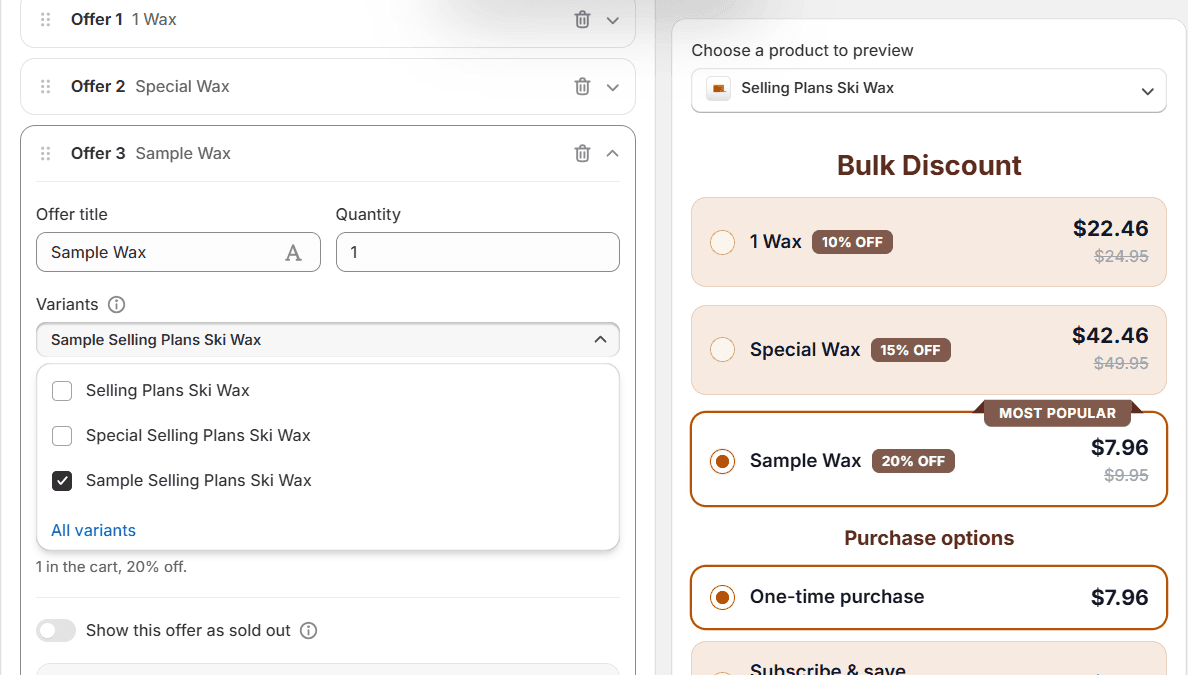
- Under Offers, open the first offer. Below Quantity, click Variants (it reads All variants until you change it) and tick the variant this offer is for, like the single light.
- Set Quantity to 1. The pack is already in the variant, so one 4-pack is one item in the cart. Then set the discount as usual.
- Repeat for the other offers: the 2-pack on one, the 4-pack on the next. Three offers of quantity 1 are fine as long as each is tied to a different variant.
- Click Publish.
To undo it, open the Variants field again and click All variants.
What the shopper sees
One ladder with a row per pack, each with its own price and its own saving. The editor’s preview draws the same block your product page gets, so this is what shoppers see.
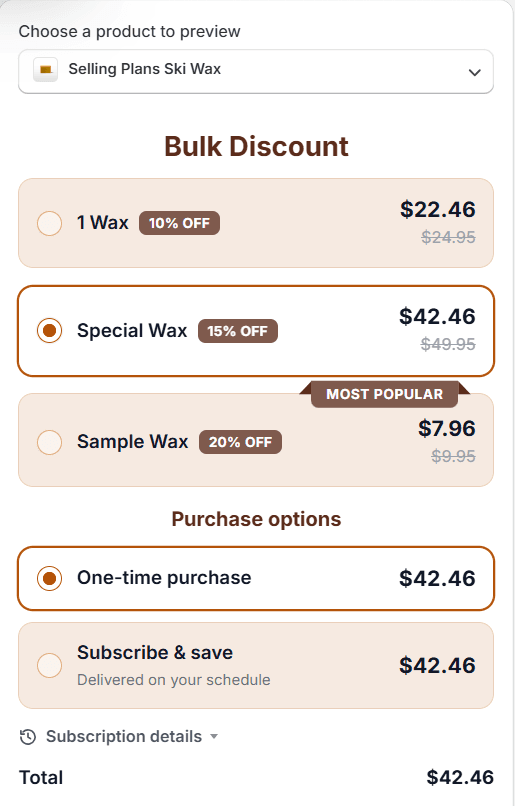
If you switch on Show variant picker, a tied row only lists the variants it is tied to. A row tied to a single variant has nothing to choose, so it shows no picker.
Things to know
- The field only appears when there is something to choose. If none of the products in the offer has more than one variant, you will not see it.
- Untied offers skip tied variants at checkout. When some offers are tied, a cart line of a tied variant is priced only by its own offers. Lines of other variants are priced by the offers tied to nothing. If every offer is tied and the shopper buys a variant none of them covers, that line gets no volume discount.
- Offers for another product’s variants are hidden. On a product page, the ladder only shows the offers that fit that product. If none fit, the block does not appear at all.
- The usual limits still apply: one ladder per product and at most six offers in it.
Pack offers are live for every store on Flash Box Builder. If your variants are packs and the ladder still does something odd, send me a screenshot. That is how this one started.